Lab highlight · Software
The Reachy Mini on ROS 2
An open-source driver that runs the servos, camera, microphones and speaker of Pollen Robotics’ Reachy Mini as ROS 2 nodes on the robot itself, together with speech recognition and speech synthesis.
- ROS 2 Lyrical
- rmw_zenoh
- ROS4HRI skills
- Apache 2.0
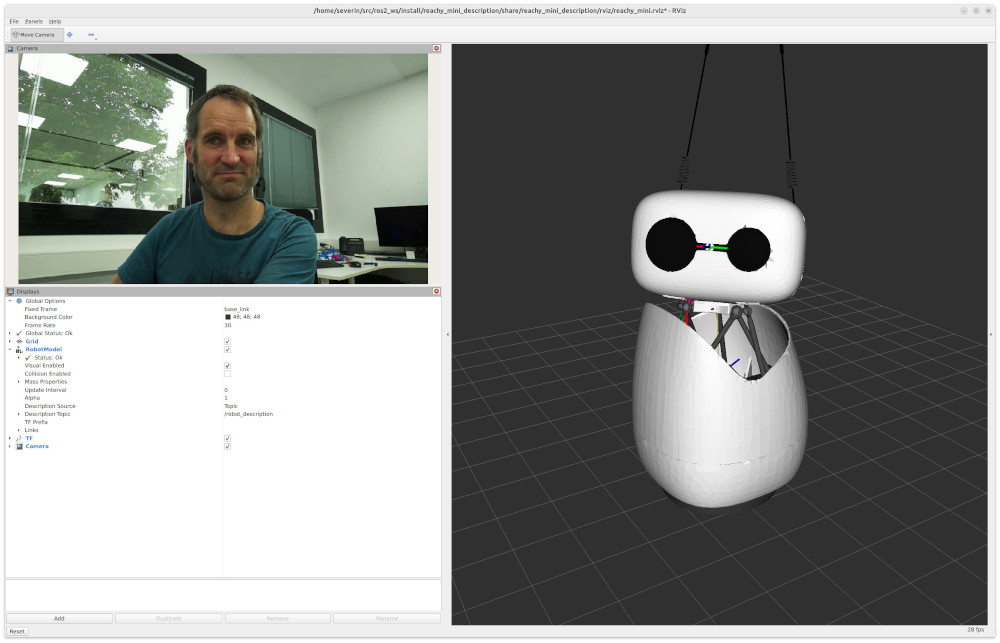
The Reachy Mini is a small, expressive and affordable open-source robot, which makes it a convenient platform for research in human-robot interaction. Much of that research, ours included, is built on ROS. This page describes how to run the robot under ROS 2, and what it then offers.
What the robot offers in ROS
Servos and kinematics
The driver publishes the nine joint angles on joint_states at 50 Hz,
computes the head pose from the forward kinematics of the Stewart platform,
and broadcasts the robot model on /tf.
Skills
The driver implements the ROS4HRI skills.
replay_motion plays moves from Pollen’s emotions and dances libraries, which
are installed with the driver. look_at turns the head towards a point, or
follows a moving one, and trajectory skills move the head, antennas and body.
Asleep and awake
The robot starts asleep, with its head lowered, and moves its antennas twice
once the driver is ready. Three taps on the head wake it up and four put it
back to sleep. The wake_up and go_to_sleep skills do the same from ROS.
Camera
The wide-angle camera is read through libcamera and encoded in H.264 by the Raspberry Pi’s hardware encoder. At 720p and 30 fps, over the sensor’s full 102° field of view, this uses about 14 % of one CPU core. Calibrations measured on the robot are included.
Microphones
The processed output of the XVF3800 microphone array is published at 16 kHz, with voice activity detection.
Speech recognition
Cactus’ Whistle model runs on the robot’s own CPU and transcribes speech at about 0.2 s of computation per second of audio. Recognition is active only while the robot is awake, and pauses while the robot speaks.
Speech synthesis
The /skill/say action speaks with Kyutai’s Pocket TTS. Its small English
model uses about half a CPU core during speech, which leaves enough capacity
for the speech recognition.
Speaker
Audio published on /audio/out is played on the robot’s speaker, mixed with
other sources by PipeWire.
Networking
ROS traffic between the robot and other machines goes through rmw_zenoh,
which needs no multicast and therefore also works from containers and across
NATs.
The installation flashes nothing and removes nothing. Pollen’s own software (their apps, HTTP API and WebRTC streaming) stays on the robot, and a setting decides which of the two stacks starts at boot. The choice can be reversed at any time.
Architecture
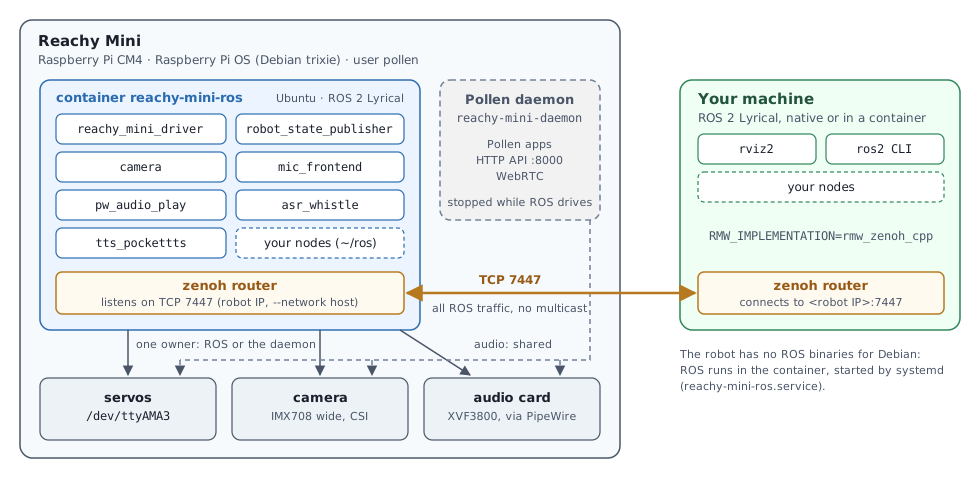
The robot runs Debian, for which no ROS 2 Lyrical binaries exist, so ROS runs in a Docker container on the robot. The servos and the camera accept only one owner at a time, either Pollen’s daemon or the ROS driver, so the two stacks take turns rather than share. Other machines reach the robot through a zenoh router on each side.
Installation
The installation takes about ten minutes, over ssh. It assumes a Reachy Mini (wireless) that has been set up once with Pollen’s app, on the same network as your computer. Everything is installed by a single Debian package, reachy-mini-ros2-bootstrap, from our apt repository.
The steps below are a summary. The detailed installation guide in the project’s README explains each one, and what to do when one fails.
Set the clock
1 minThe robot has no battery-backed clock, so after a long power-off its date can be far off. With a wrong date, every https connection fails,
aptincluded, because the server’s certificate appears expired or not yet valid. The following command, run on your computer, copies your computer’s time to the robot over ssh. The default password of thepollenaccount isroot; it is asked for twice, once by ssh and once by sudo.ssh -t pollen@reachy-mini.local "sudo date -u -s @$(date +%s)"Log in and add our apt repository
1 minssh pollen@reachy-mini.local sudo mkdir -p /etc/apt/keyrings curl -fsSL https://socialminds.doc.iiia.csic.es/apt/public.key | gpg --dearmor | sudo tee /etc/apt/keyrings/socialminds.gpg > /dev/null echo "deb [signed-by=/etc/apt/keyrings/socialminds.gpg] https://socialminds.doc.iiia.csic.es/apt/ lyrical main" | sudo tee /etc/apt/sources.list.d/socialminds.listThe repository is built for Ubuntu, while the robot runs Debian. The package installed in the next step depends on Debian packages only, and it is the only package from this repository to install on the robot, since the ROS packages are in the container.
Install the package
5 minsudo apt update sudo apt install reachy-mini-ros2-bootstrap journalctl -u reachy-mini-ros -fThe package installs Docker and the systemd service that keeps the ROS container running. On its first start, the service downloads the ROS image (about 1.5 GB) from our public registry, and the last command follows the download. The package also starts PipeWire at boot with the robot’s speaker and microphones, and configures a time server that is reachable from restricted networks. The first step set the clock to within a few seconds, which is enough for https but not for zenoh, which rejects messages from machines whose clocks differ by more than 500 ms.
At the end of the installation, the package prints the next steps.
Speaker volume
1 minPollen’s daemon sets the speaker’s two gain stages when it starts. Without the daemon, both stay at -20 dB and the speaker is barely audible. The following command sets them permanently.
amixer -c 0 sset PCM,0 100% && amixer -c 0 sset PCM,1 100% && sudo alsactl store 0The volume is then adjusted from ROS, for instance with
ros2 param set /pw_audio_play volume 0.5.ROS as the default (optional)
1 minWith this step, the robot starts the ROS driver at boot instead of Pollen’s daemon, and remains asleep until it is woken up.
sudo systemctl disable --now reachy-mini-daemon
sudo systemctl enable --now reachy-mini-driver-docker
Without this step, Pollen’s daemon remains the default, and the robot is handed over to ROS when needed with
sudo systemctl stop reachy-mini-daemon, followed bydocker exec -it reachy-mini-ros bash -c "ros2 launch reachy_mini driver.launch.py".
Connecting a computer
The computer needs ROS 2 Lyrical, either installed on Ubuntu 26.04 or in a
ros:lyrical container. To run RViz from a container, share the X11 socket
with it, and the host’s network so that the zenoh router can reach the robot.
xhost +local:docker
docker run -it --rm --net=host -e DISPLAY -v /tmp/.X11-unix:/tmp/.X11-unix ros:lyrical
The container runs as root and has no sudo: omit it from the commands
below, and install curl and gnupg first with
apt update && apt install -y curl gnupg.
Then install zenoh, RViz, the robot’s description and the skill definitions from our apt repository (the same one as on the robot), and load the ROS environment.
sudo mkdir -p /etc/apt/keyrings
curl -fsSL https://socialminds.doc.iiia.csic.es/apt/public.key | gpg --dearmor | sudo tee /etc/apt/keyrings/socialminds.gpg > /dev/null
echo "deb [signed-by=/etc/apt/keyrings/socialminds.gpg] https://socialminds.doc.iiia.csic.es/apt/ lyrical main" | sudo tee /etc/apt/sources.list.d/socialminds.list
sudo apt update
sudo apt install ros-lyrical-rmw-zenoh-cpp ros-lyrical-rviz2 ros-lyrical-ffmpeg-image-transport \
                 socialminds-ros-lyrical-reachy-mini-description \
                 socialminds-ros-lyrical-motions-skills socialminds-ros-lyrical-interaction-skills \
                 socialminds-ros-lyrical-communication-skills
source /opt/ros/lyrical/setup.bash
Then start a zenoh router connected to the robot’s router, and open RViz.
export RMW_IMPLEMENTATION=rmw_zenoh_cpp
ZENOH_CONFIG_OVERRIDE='connect/endpoints=["tcp/<robot IP>:7447"]' ros2 run rmw_zenoh_cpp rmw_zenohd &
rviz2 -d $(ros2 pkg prefix reachy_mini_description)/share/reachy_mini_description/rviz/reachy_mini.rviz
A first movement
When the driver starts, the robot is asleep, with its head resting on its mechanical stop. It moves its antennas twice when the driver is ready. Three taps on the head wake it up, with Pollen’s wake-up animation the first time, and four taps put it back to sleep. The same transitions can be triggered from a computer.
ros2 action send_goal /skill/wake_up motions_skills/action/ReplayMotion "{name: wake-mini-up}"
ros2 action send_goal /skill/go_to_sleep std_skills/action/Empty "{}"
Once the robot is awake, and with some free space around it, the following commands play a recorded move and make the head glance at a point.
ros2 action send_goal /skill/replay_motion motions_skills/action/ReplayMotion "{name: cheerful1}"
ros2 action send_goal /skill/look_at interaction_skills/action/LookAt \
    "{policy: glance, target: {header: {frame_id: base_link}, point: {x: 1.0, y: 0.5, z: 0.3}}}"
The emotions library contains 85 moves, from amazed1 to yes_sad1, and the
dances library a further 19. Both are installed with the driver, so playing
them requires no network access.
ros2 service call /skill/list_motions motions_skills/srv/ListMotions lists
them.
A first conversation
While the robot is awake, the transcriptions of what is said near it are
published on /humans/voices/anonymous_speaker/speech, first as partial
results and then as a final one. The robot speaks through the /skill/say action.
ros2 topic echo /humans/voices/anonymous_speaker/speech
ros2 action send_goal /skill/say communication_skills/action/Say \
    "{input: 'Hello, I am Reachy Mini.', meta: {caller: test, priority: 128}}"
Recognition pauses while the robot speaks, so the robot does not transcribe its own voice. The recognition still makes errors; a loud noise, such as an object dropped on the table, is occasionally transcribed as a short phrase (“Thank you.”).
Verifying the installation
| check | command | expected |
|---|---|---|
| servos | ros2 topic hz /joint_states | about 50 Hz |
| camera | ros2 topic hz /camera/image_raw/ffmpeg | about 30 Hz |
| microphones | ros2 topic echo /audio/head/voice_detected | true while someone speaks |
| skills | ros2 service call /skill/list_motions motions_skills/srv/ListMotions | the names of the moves |
| sleep state | ros2 param get /robot_blackboard awake | changes with the head taps and with /skill/wake_up and /skill/go_to_sleep |
| speech recognition | ros2 topic echo /humans/voices/anonymous_speaker/speech | with the robot awake, the spoken text, within about a second |
| speech synthesis | the /skill/say goal above | the robot speaks the sentence |
The test section of the README lists further checks, and what to examine when one fails.
Documentation
README
Installation, usage, tests and troubleshooting, in full. Read the README
Reference
The topics, parameters, skills and TF frames of every node, and the details of the camera and audio. Read the reference
Design
The reasons behind the driver’s design choices. Read the design notes
Acknowledgements
The driver relies on Pollen Robotics’ open motor-controller and kinematics code, and on their emotions and dances libraries. Speech recognition uses the Whistle model by Cactus, and speech synthesis uses Pocket TTS by Kyutai. The driver implements the ROS4HRI skills and is released under the Apache 2.0 licence. Bug reports and contributions are welcome on the repository.